FOR SALARIES, SHIFTS AND GIG WORK IN AUSTRALIA

What can you spend todaywithout compromisingyour next payday?

Salary, rostered shifts or Uber Eats runs: see what’s safe to spend before your next pay lands.

Explore the app
Free to start · Plus 14 days freeNo bank connectionPhone, desktop & Telegram
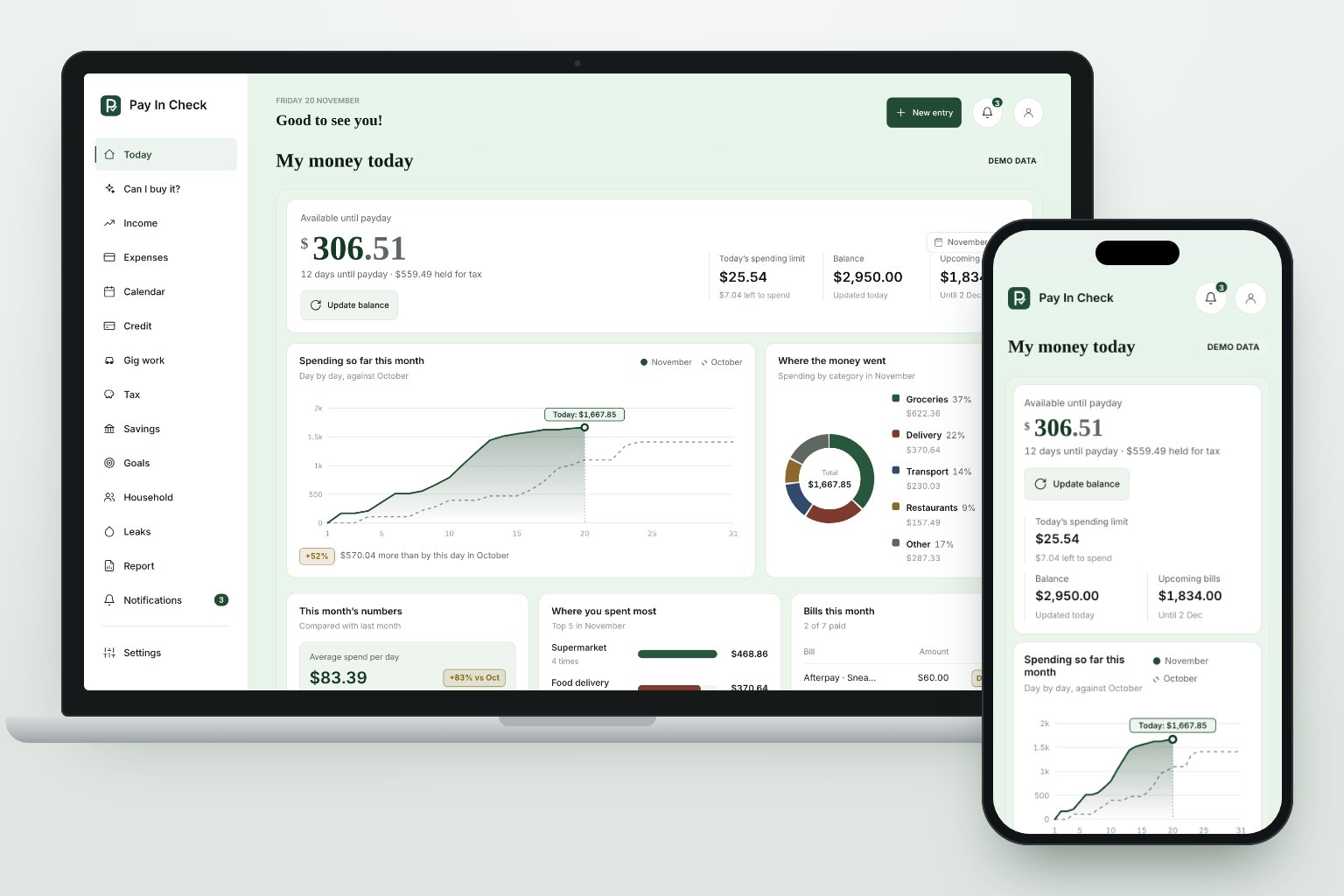
Illustrative Pay In Check dashboard on laptop and phone, showing demo data
Illustrative preview · Demo data, not a live account
A little clarity goes a long way
WHAT MAKES IT DIFFERENT

Most budget apps stop at categories. Pay In Check answers the questions you actually have.

Four things built for people paid by the shift, the delivery or the invoice in Australia.

Plus

Does Uber Eats still pay?

Log each session’s earnings, hours and kilometres. Pay In Check takes off fuel, wear and tear and tax to show what you really make per hour, by platform and by time of day.

  • Gross and real hourly, side by side
  • Your best days and times to work
  • A weekly target with what’s left to earn

Gross vs real: what’s left after costs
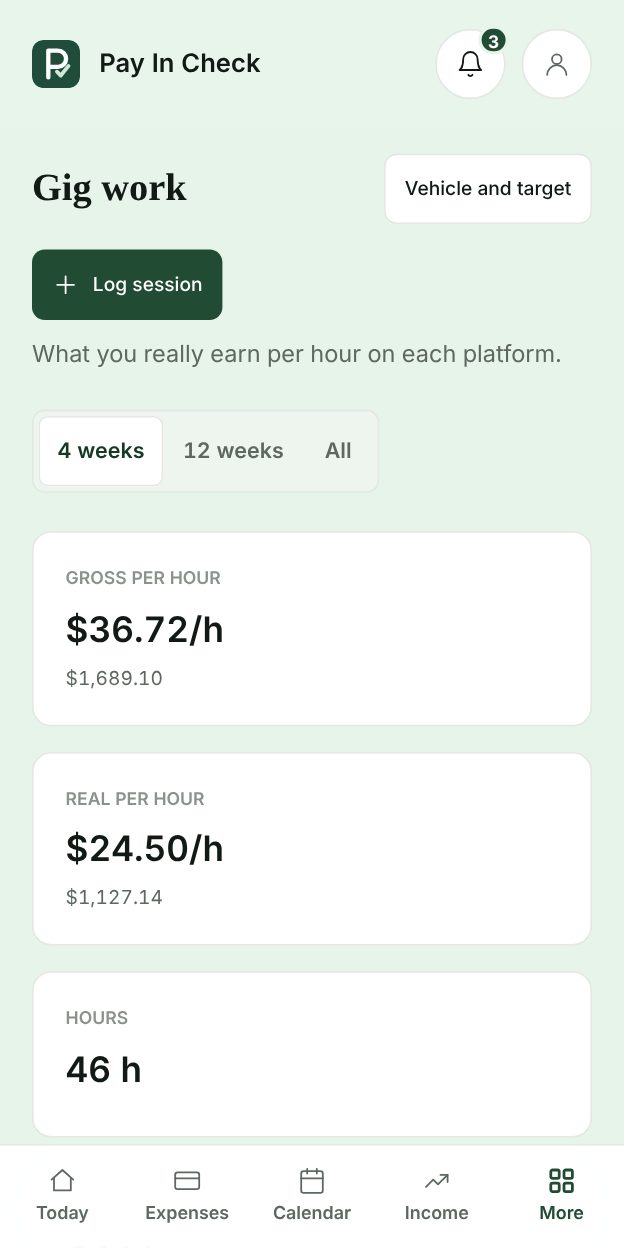
Does Uber Eats still pay? · app screen with example data
Plus

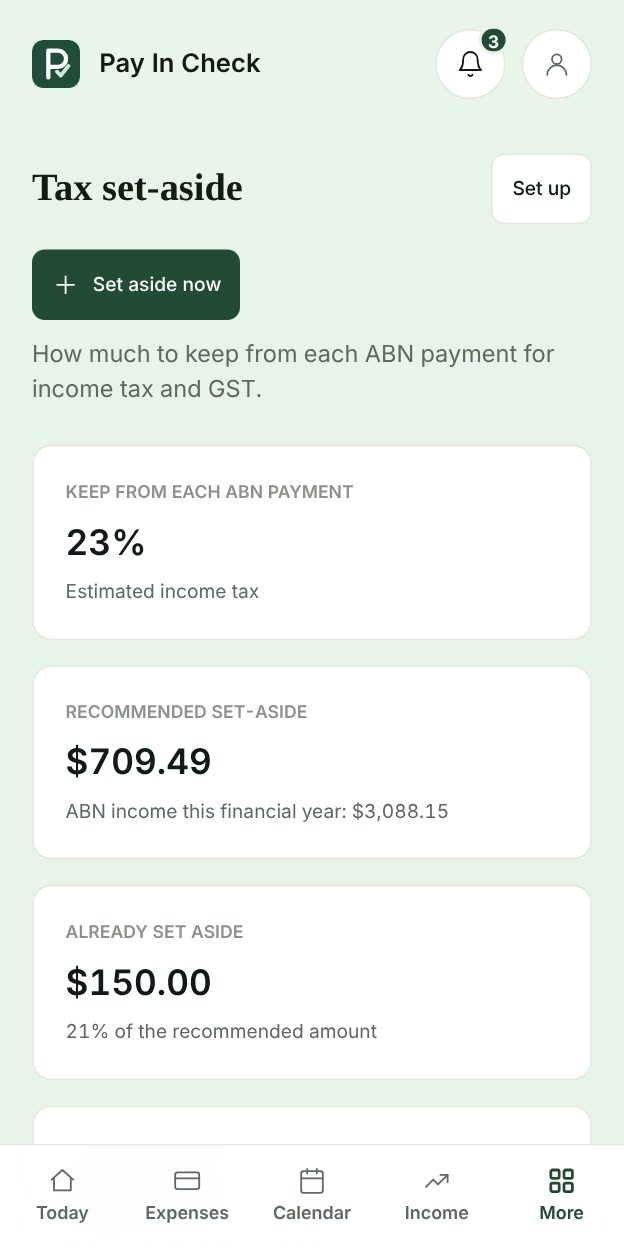
No surprise tax bill on your ABN income

For every ABN payment, the app works out how much to keep for income tax (2026–27 resident rates, Medicare levy and offsets) and for GST, and keeps it out of what you can spend.

  • How much to keep from each payment
  • Held money stays out of your daily limit
  • BAS reminders if you’re registered for GST

Keep 23% of each ABN payment

No surprise tax bill on your ABN income · app screen with example data
Plus

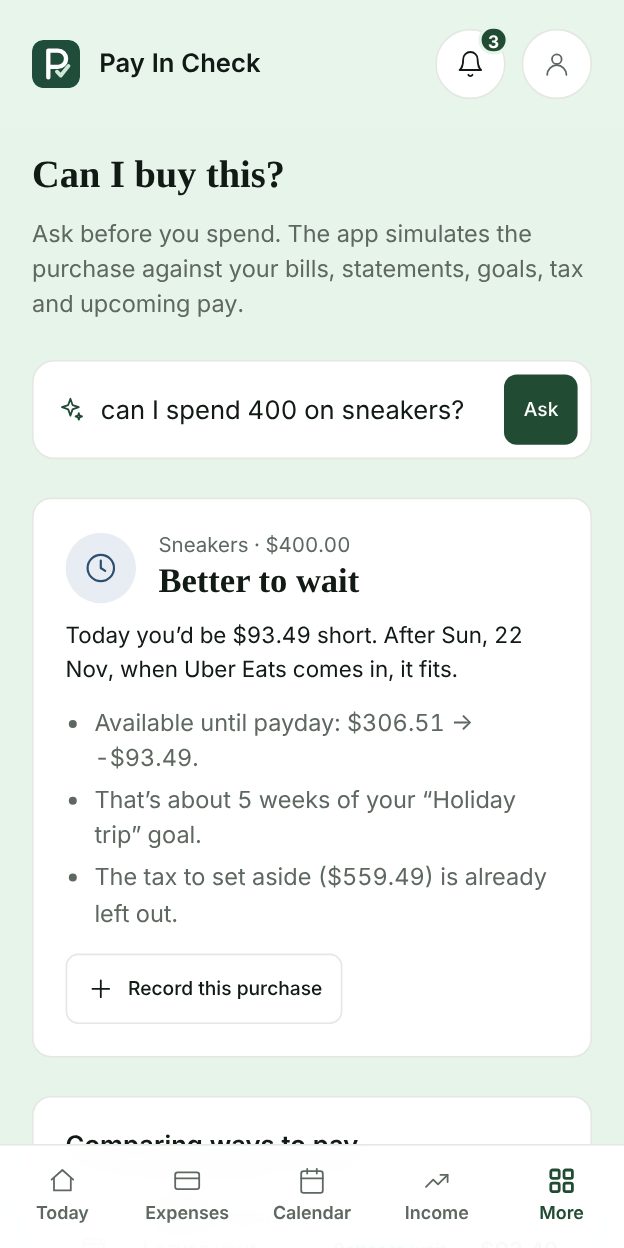
Ask before you buy

Type “can I spend $400 on sneakers?”. The assistant runs the purchase against your bills, card statements, goals, tax and upcoming pay, then answers yes, wait until a date, or no, and says why.

  • Compares paying now, by card or with Afterpay
  • Tells you the date it would fit
  • Works in the app and on Telegram

Better to wait: it fits after your next pay

Ask before you buy · app screen with example data
Free

Just send a message. Your budget updates itself.

Text our Telegram bot like you’d text a friend: “spent 32 at Woolies”, “got paid 640 from the café”, “paid the electricity”. It records it, recalculates your daily limit and replies in seconds, without opening the app.

  • Spending, income, bills and savings by message
  • Reminders at 9 am and 7 pm, even with the app closed
  • Free on every plan, in English or Portuguese

Most budget apps vs Pay In Check

FeatureMost budget appsPay In Check
Spending categories and monthly reports
What you can spend each day until payday
Shift roster with expected pay
Real hourly for gig work after fuel and costs
Tax set-aside for ABN and GST
Ask if a purchase fits before you buy
Log by Telegram message, without opening the app
Asks for your bank loginOftenNever
YOUR MONEY, WITH A CLEARER PICTURE

One simple view.A little more breathing room.

Know what’s coming in, what’s going out, and what could be left before your next payday. No spreadsheet gymnastics.

See beyond your balance

An estimate of what’s available after your reserved money, new spending, and bills due before payday.

Make room for real life

Weekly, fortnightly, monthly, or variable income. Your plan follows your pay, not the other way around.

Keep the important things in sight

Track due dates, recurring bills, goals, and in-app reminders. Optional browser notifications need your permission.

Discover where your money is going, how to organise it, and put together a financial plan in 5 minutes. No complicated spreadsheets, no giving up every little pleasure, no waiting for a pay rise. Just a practical financial check-in — even if you don't know what you spend today.

DIFFERENT SOURCES. ONE CLEAR PICTURE.

One view for all your income

Your money comes from different sources. Keep track of it all in one place.

Record salary, deliveries, and other types of income. The app brings these entries together in a summary by period and shows what has arrived, what is processing, and what is still expected.

In the app, you can:

  • Add sources such as salary, Uber Eats, DoorDash, Amazon Flex, tasks, or freelance.
  • See the total recorded for the period and check where each amount comes from.
  • Separate received payments from those still processing or expected.
  • Update the status when the money arrives.
Pay In Check
DEMO DATA

Illustrative period · 01–30 Nov

Income overview

Total recorded$3,290.00Recorded income · Not your available balance
Received$2,520.00
Processing$260.00
Expected$510.00
SourceAmount
SalaryReceived
$2,400.00
Uber EatsProcessing
$185.00
DoorDashReceived
$120.00
Amazon FlexExpected
$160.00
TasksProcessing
$75.00
FreelanceExpected
$350.00
Illustrative preview · Demo data, not a live account
BUILT FOR HOW YOU ACTUALLY GET PAID

Real screens. Real answers.

Every screen below is the app itself, filled with example data.

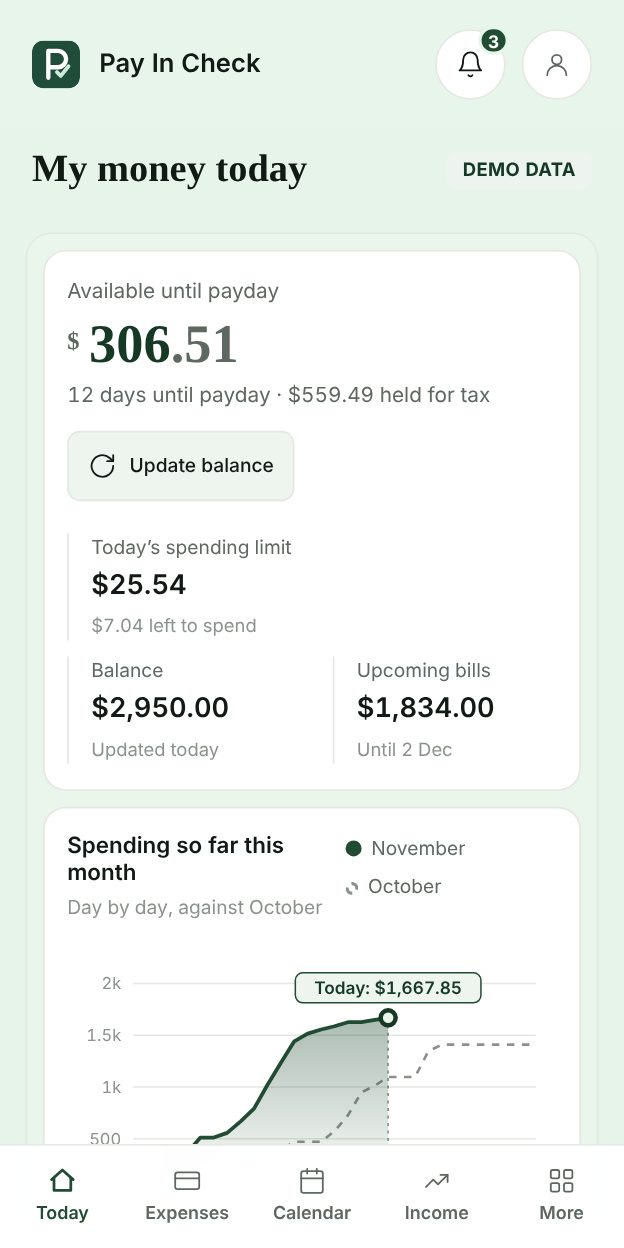
My money today · app screen with example data
Free

My money today

What’s left until payday, your daily limit and the tax already put aside, in one number.

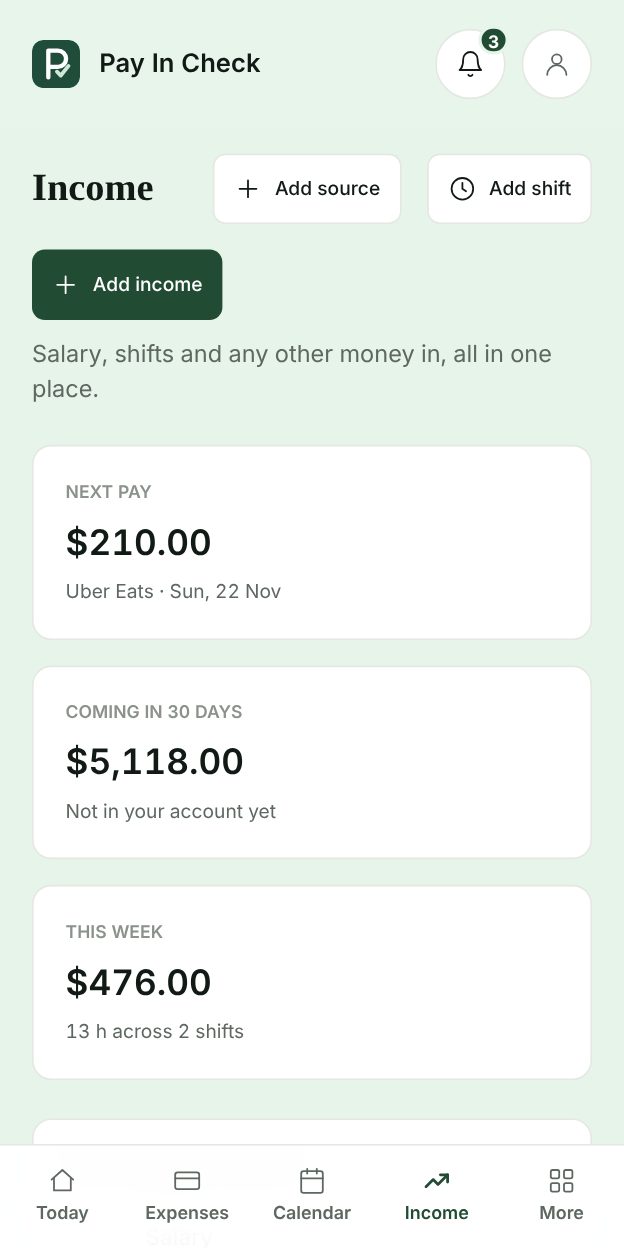
Income and shifts, together · app screen with example data
Free

Income and shifts, together

Set up a fixed salary (weekly, fortnightly or monthly) and your casual jobs in one place. Book shifts and see each pay before it lands.

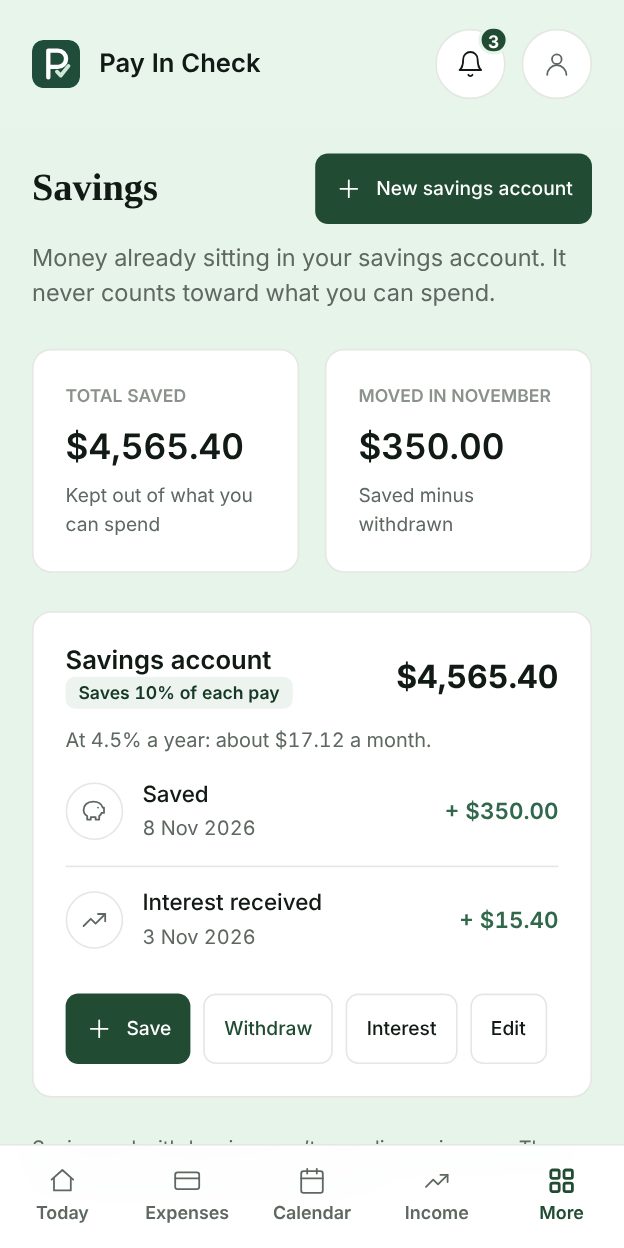
Savings kept apart · app screen with example data
Free

Savings kept apart

Money already in your savings account never counts as spendable. Move a share in when pay lands, take it back when you need it.

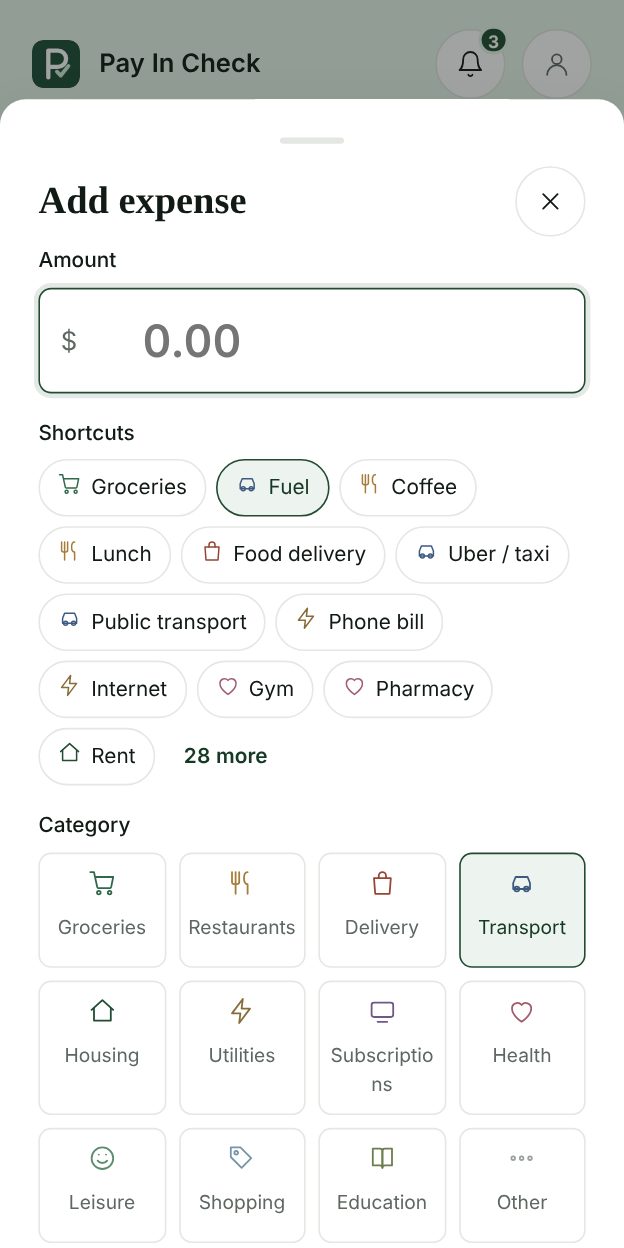
Log spending in one tap · app screen with example data
Free

Log spending in one tap

Shortcuts for fuel, phone bill, gym, groceries and more, plus the ones you use most.

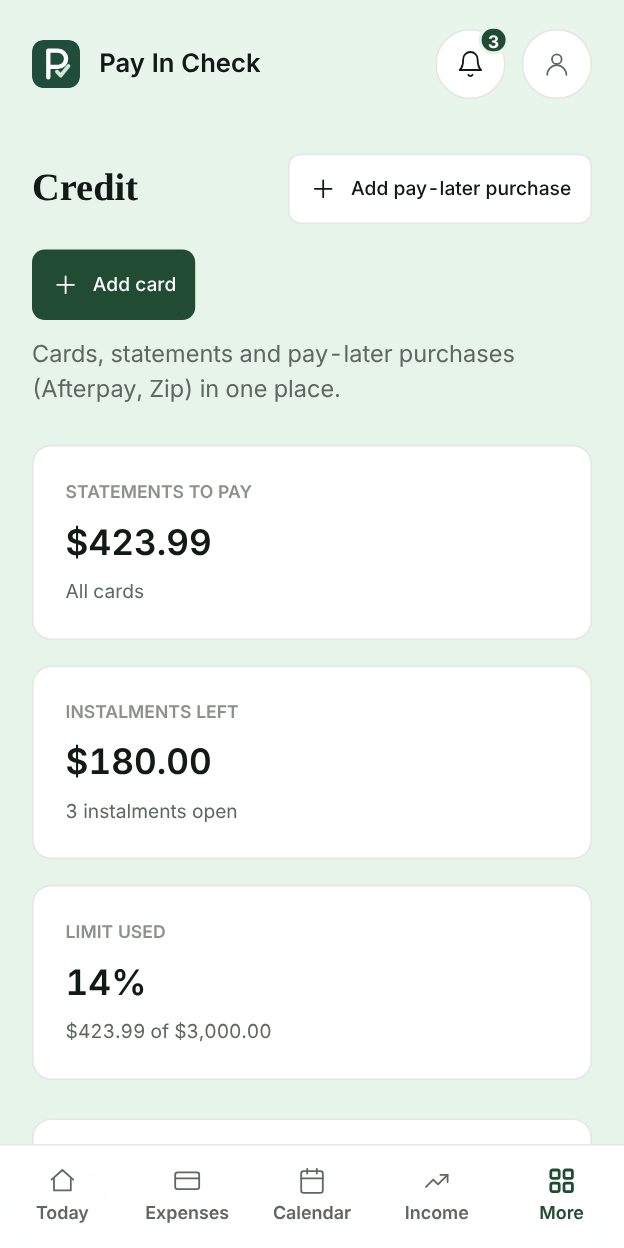
Credit cards, Afterpay and Zip · app screen with example data
Plus

Credit cards, Afterpay and Zip

Statements, due dates and pay-later instalments counted before they hit, not after.

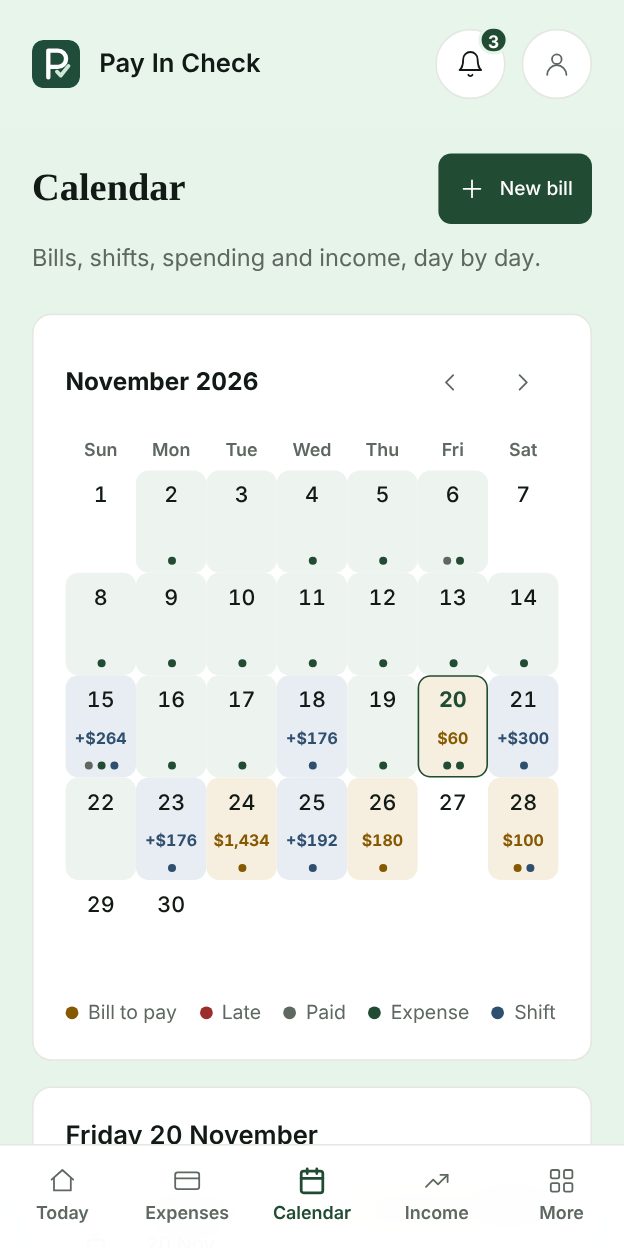
Bills calendar · app screen with example data
Free

Bills calendar

Bills, shifts, spending and pay, day by day, with reminders before anything is due.

Also in the toolkit

Expenses

Free

Log spending by category and see where it goes.

Bills calendar

Free

Due dates, recurring bills and reminders in one place.

Savings goals

Free

One goal on Free, as many as you like on Plus.

Couple and family mode

Plus

One budget for the home. Everyone keeps their own income and private spending, and bills split fairly.

Reminders that find you

Free

Bills due, shift pay and a nudge to log, by Telegram at 9 am and 7 pm.

Leaks, full report and CSV

Plus

Spots subscriptions and habits that quietly add up, with month-by-month reports ready to export.

Made for your routine

English or Portuguese. One main currency per account. No mixed-currency totals, automatic conversion, or bank transaction imports. Missing information stays visible — never filled with invented numbers.

SIMPLE TO START. EASY TO KEEP UP.

From “I think” to “I can see.”

A few details. A clearer picture. A routine you can actually keep.

01

Start with where you are

Enter your balance, reserved amount, next income, and bills due before it arrives.

02

Keep life up to date

Record new spending and update your information whenever something changes.

03

See what could be left

Check your estimate and see exactly which information went into the calculation.

START FREE. UPGRADE WHEN IT PAYS OFF

Start free. Upgrade to Plus.

The essentials are free forever. Plus comes with 14 days free and you can cancel anytime.

Free

AUD0/month

Forever, no card needed


  • What you can spend until payday
  • Income, expenses, bills and calendar
  • Shift roster with expected pay
  • Telegram logging and reminders
  • 1 goal, 1 savings account and 1 credit card

Upgrade to Plus whenever you like.

Plus Monthly

AUD12.90/month

Billed monthly


  • Everything in Free
  • Real hourly for gig work
  • Tax set-aside for ABN and GST
  • Unlimited cards and savings, Afterpay and Zip
  • “Can I buy this?” in the app and Telegram
  • Couple and family mode
  • Leak detector, full report and CSV

14 days free. Cancel anytime.

Plus Annual

Best value
AUD8.25/month

AUD 99.00 billed annually

Save AUD 55.80 a year (36%)

  • Everything in Free
  • Real hourly for gig work
  • Tax set-aside for ABN and GST
  • Unlimited cards and savings, Afterpay and Zip
  • “Can I buy this?” in the app and Telegram
  • Couple and family mode
  • Leak detector, full report and CSV

14 days free. Cancel anytime.

Free and Plus, side by side

FeatureFreePlus
What you can spend until payday, daily limit
Income, expenses, bills and calendar
Shift roster with expected pay
Telegram logging and reminders
Savings goals1Unlimited
Savings accounts kept out of your balance1Unlimited
Credit cards1Unlimited + Afterpay and Zip
Couple and family modeJoin a householdCreate and invite
“Can I buy this?” in the app and Telegram
Tax set-aside for ABN and GST
Real hourly for gig work
Leak detector, full report and CSV
A FEW THINGS YOU MIGHT BE WONDERING

Good questions. Clear answers.

How do I access the app?

Create your free account and start using the essentials straight away. When you want the Plus features, try them free for 14 days and manage or cancel anytime in Settings → My plan.

Does it work for shift and gig workers?

That’s who it’s built for. Add your jobs with hourly rates and pay cycles, plan your roster and see the expected pay for each run. With Plus, gig sessions show your real hourly after fuel, wear and kilometres.

How does the tax set-aside work?

If you earn ABN income, Plus estimates how much of each payment to keep for income tax (2026–27 resident rates, Medicare levy and offsets) and for GST if you’re registered. It’s an estimate to help you save, not tax advice: check with a registered tax agent or the ATO.

How does Telegram work?

In Settings, tap Connect Telegram. It opens our bot with a one-time code. Then send messages like “spent 25 on lunch”. You can turn reminders off or disconnect anytime.

Can I share a budget with my partner?

Yes. With Plus you create a household and invite your partner or family. Shared bills are split by income, equally or by your own rule, and each person’s private spending stays private.

I already have a savings account. How does that work?

Add it under Savings with what’s in it today. That money stays out of what you can spend. When pay lands, the app can suggest moving a share (say 10%) across, and you can withdraw back to your balance anytime, in the app or by Telegram.

Does it connect to my bank?

No. You enter balances, income, expenses and bills yourself, in the app or by Telegram. There is no bank connection or automatic transaction import.

Does it work on my phone?

Yes. It runs in your phone, tablet or desktop browser, and you can add it to your home screen like an app.

What if I don’t know a bill’s amount?

Missing information is flagged, not guessed. Add or update the amount when you know it. The estimate depends on your records and is not a guaranteed balance or saving.

A CLEARER NEXT PAYDAY STARTS HERE

Less mental maths.More room to live.

You don’t have to have it all figured out. Start with what you know.